
File Setup Templates for Perfect Printing Every Time
Business Essentials
Business cards must be prepared with the following specifications:
Resolution: 300 dpi (dot per inch).
Color Mode: CMYK (Cyan, Magenta, Yellow, and Black).
Bleed: 0.125 inch extra around artwork.
File Type: Flatten and save your files as PDF, JPG, GIF, or PNG.
Postcards must be prepared with the following specifications:
Resolution: 300 dpi (dot per inch).
Color Mode: CMYK (Cyan, Magenta, Yellow, and Black).
Bleed: 0.125 inch extra around artwork.
File Type: Flatten and save your files as PDF, JPG, GIF, or PNG.
Flyers must be prepared with the following specifications:
Resolution: 300 dpi (dot per inch).
Color Mode: CMYK (Cyan, Magenta, Yellow, and Black).
Bleed: 0.125 inch extra around artwork.
File Type: Flatten and save your files as PDF, JPG, GIF, or PNG.
Brochures must be prepared with the following specifications:
Resolution: 300 dpi (dot per inch).
Color Mode: CMYK (Cyan, Magenta, Yellow, and Black).
Bleed: 0.125 inch extra around artwork.
File Type: Flatten and save your files as PDF, JPG, GIF, or PNG.
Folding Options: Tri Fold, Z Fold, Half Fold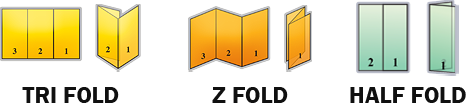
Door Hangers must be prepared with the following specifications:
Resolution: 300 dpi (dot per inch).
Color Mode: CMYK (Cyan, Magenta, Yellow, and Black).
Bleed: 0.125 inch extra around artwork.
File Type: Flatten and save your files as PDF, JPG, GIF, or PNG.
Signs & Banners
Coroplast yard signs must be prepared with the following specifications:
Resolution: 200 dpi (dot per inch).
Color Mode: CMYK (Cyan, Magenta, Yellow, and Black).
Bleed: Requires a 0.5 inch bleed on all sides. If ordering at 24 inch by 18 inch, your file size should be 25 inches by 19 inches to allow for bleed.
File Type: Flatten and save your files as PDF, JPG, GIF, or PNG.
Vinyl banners must be prepared with the following specifications:
Resolution: Full scale at approximately 300 dpi (dot per inch).
Color Mode: CMYK (Cyan, Magenta, Yellow, and Black).
Bleed: No bleed, no crops - make your artwork exactly the size you are ordering. We suggest you keep any important text / artwork 2 inches inward from the edge of your artwork as to avoid any elements being cut off / hemmed over.
File Type: Flatten and save your files as PDF, JPG, GIF, or PNG.
Stand up banners must be prepared with the following specifications:
Resolution: 300 dpi (dot per inch).
Color Mode: CMYK (Cyan, Magenta, Yellow, and Black).
Bleed: The file should include a 1/8" bleed, and all essential artwork and text must remain within the designated safety margin. Allowing extra safety margin is recommended to prevent trims from appearing too close or cutting off important design elements.
File Type: Flatten and save your files as PDF, JPG, GIF, or PNG.
Adhesive vinyls must be prepared with the following specifications:
Resolution: 300 dpi (dot per inch).
Color Mode: CMYK (Cyan, Magenta, Yellow, and Black).
Bleed: Ensure you have 0.125" on all sides of your artwork, do not add crops. (Download our flag templates to ensure your artwork is set-up correctly.)
File Type: Flatten and save your files as PDF, JPG, GIF, or PNG.
Stickers & Labels
Stickers must be prepared with the following specifications:
Resolution: 300 dpi (dot per inch).
Color Mode: CMYK (Cyan, Magenta, Yellow, and Black).
Bleed: 0.125 inch extra around artwork.
File Type: Flatten and save your files as PDF, JPG, GIF, or PNG.
Roll labels must be prepared with the following specifications:
Resolution: 300 dpi (dot per inch).
Color Mode: CMYK+W (Cyan, Magenta, Yellow, Black + White).
Bleed: 0.125 inch extra around artwork.
File Type: Flatten and save your files as PDF, JPG, GIF, or PNG.
Promotional Products
Magnets must be prepared with the following specifications:
Resolution: 300 dpi (dot per inch).
Color Mode: CMYK (Cyan, Magenta, Yellow, and Black).
Bleed: 0.125 inch extra around artwork.
File Type: Flatten and save your files as PDF, JPG, GIF, or PNG.
T-Shirts must be prepared with the following specifications:
Resolution: At least 150 dpi (dot per inch).
Color Mode: Create your print file in sRGB color profile to ensure that your design looks as close as possible to what appears on your screen.
File Type: Flatten and save your files as PDF, JPG, GIF, or PNG. For designs with transparent backgrounds, we recommend using PNG. For other designs, prepare files in JPG instead.
Ceramic mugs must be prepared with the following specifications:
Resolution: At least 150 dpi (dot per inch).
Color Mode: Create your print file in sRGB color profile to ensure that your design looks as close as possible to what appears on your screen.
File Type: Flatten and save your files as PDF, JPG, GIF, or PNG.
Tote bags must be prepared with the following specifications:
Resolution: At least 150 dpi (dot per inch).
Color Mode: Create your print file in sRGB color profile to ensure that your design looks as close as possible to what appears on your screen.
Bleed: Tote Bag art files do not need bleed.
File Type: Flatten and save your files as PDF, JPG, GIF, or PNG. For designs with transparent backgrounds, we recommend using PNG. For other designs, prepare files in JPG instead